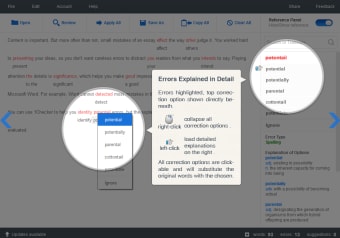
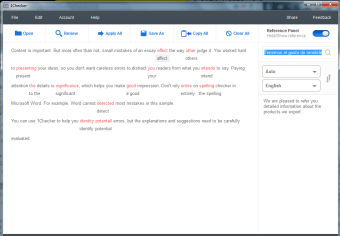
1Checker is a free proofreading app with several tools to help perfect your English texts. 1Checker features a spell check, grammar check, style reviewer, vocabulary enrichment tool (basically a thesaurus), dictionary and translation tool all in one. 1Checker has a very simple and easy to use interface where you simply open a document within it or paste text, and then simply let 1Checker highlight your errors. You can apply all changes in a click or just apply those that you want to keep.
1Checker is the automated all-in-one proofreading solution for Windows users.
1Checker is designed to solve all these problems. Recently launched by Greedy Intelligence ®C a company dedicated to NLP and applied linguistics technologies, it is the automated all-in-one proofreading solution for Windows users, offering spell/grammar/punctuation checking, vocabulary enrichment, dictionary, translation and much more. In addition to its Windows 8 app, the newly launched full PC client version (for Windows 7, Vista, XP) can be your alternative choice for writing enhancement with more features and full support, free of charge.
Based on core engines and patented algorithms, 1Checker mainly does proofreading work, tempting to aid you finding writing issues, suggest corrections, give in-depth explanation and detailed examples, and enhance word usage anywhere, any time. Beside proofreading, dictionary and translation gadgets can assist you in a swift way. At the end of your writing, 1Checker will give you a general evaluation on your word usage and sentence structure. It's mentioned that all these functions can be used in ONE panel from 1Checker. Regarding the proofreading effect, there is a saying that fact speaks louder than words. Compared with Microsoft Word's spellchecker, 1Checker can do much more.
We've found 1Checker to be accurate for most writings. We do note that 1Checker should be considered a helpful writing tool as it incorporates grammar, spelling, word choice, and style, but not the author's arguments, logic, organization, and ideas. The latter will still need to be examined by a human.
Writers, bloggers, those who email a lot, those with English as a second language, etc.
Yes, it is good software to check spelling and grammar, and other spelling mistakes.
Anonymous user
Not worth downloading.. I'm not a fan of this app. It's not reliable. It always seem to crash when I want to check a paragraph or two. Pros: The enhancements Cons: Please fix the crashes
Anonymous user
Very, very poor attempt. Don't waste time on it.. Looked really good and I was excited as I do a lot of writing. In my opinion, this software is the worst I have seen and should be avoided like the proverbial plague. On my first time out with it, it began to offer corrections to words that were fine as they were. I clicked on the correction as an experiment and found that it placed one word inside another, didn't understand tenses, misspelled words, and more! Considering it came with such a high review score and I am the first to review it, I'd love to know how the developer gamed the system to make this seem an attractive option. Pros: Interface is nice Cons: Does nothing it is supposed to
Laws concerning the use of this software vary from country to country. We do not encourage or condone the use of this program if it is in violation of these laws. Softonic may receive a referral fee if you click or buy any of the products featured here.